
Dairy Queen® Food & Treats
International Dairy Queen®️Food & Drink
4.014.28K Reviews
- Version
- 5.6.0
- Installs
- 10.00M
- Age Rating
- Everyone
Screenshots
Our Review of Dairy Queen® Food & Treats
 Analysis by Appyee
I use Dairy Queen® Food & Treats as a practical companion when I already know I want something from Dairy Queen and would rather avoid standing in line or searching for a deal at the last minute. It is a free Food & Drink app from International Dairy Queen®️, built around three useful jobs: finding available offers, collecting rewards, and placing an order ahead of time. That focus makes it more valuable for repeat visitors than for someone who only visits occasionally and is happy to order at the counter.
My overall impression is positive, but quite specific. This is not an all-purpose restaurant discovery tool, a meal-planning service, or a replacement for every way of ordering food. Its strength is reducing friction around a familiar Dairy Queen visit. When the restaurant is already part of your routine, the combination of deals, reward progress, saved ordering habits, and advance ordering can make the app worth keeping. When you are comparing several nearby restaurants, dealing with a complicated group order, or simply want to browse without committing to a location, the experience feels more limited.
How the app feels today
The current version is 5.1.0, and the app has been available since May 22, 2018. That history matters because this is a mature branded ordering app rather than a newly launched experiment. It has reached over 10 million installs, with an average rating of 4.1 from around 71 thousand ratings and about 14 thousand written reviews. Those figures suggest a product that many people use successfully, while also leaving room for the occasional frustration that comes with restaurant apps and location-specific ordering.
The first thing I would tell a friend is to think of it as a visit-management tool. You open it before you go, choose the Dairy Queen location that makes sense, check whether an offer is useful, and decide whether ordering ahead will save time. That sequence is more important than any individual screen. The app works best when it supports a plan you already have, such as picking up treats after work, arranging a quick stop during a road trip, or repeating a family order that you have made before.
The app is rated for Everyone, which fits its straightforward purpose. I found the basic idea easy to understand: the brand, the menu context, the rewards area, and the order-ahead option all point toward the next visit. The free price also removes the main barrier to trying it. Still, “free” does not mean every order becomes cheaper. The real value depends on whether the available offers fit what you were going to buy anyway and whether your selected location supports the ordering flow you want.
Deals are most useful when you plan around them
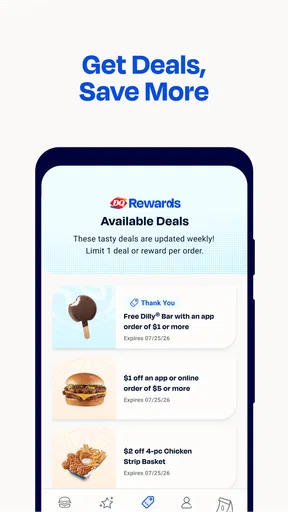
The deals section is the feature most likely to attract a first-time user, but I would avoid treating it like a permanent discount guarantee. Offers can change, and a promotion only helps if it matches your appetite, timing, and chosen restaurant. My practical approach is to check the app before deciding what to order rather than adding food impulsively just to use a deal. That small habit keeps the offer from turning into an excuse for a larger purchase.
There is also a useful distinction between seeing a deal and being ready to redeem it. If I am meeting friends, I would check the offer before leaving home, read the conditions carefully, and make sure I understand whether it belongs in an advance order or needs to be handled another way. Doing this early is less stressful than trying to interpret a promotion while people are waiting. The app is convenient, but convenience still depends on paying attention to the details attached to each offer.
Rewards work best for predictable visits
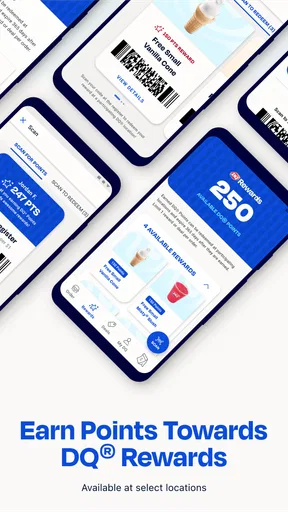
The rewards system gives regular customers a reason to keep using the app instead of treating it as a one-time download. In my experience, the important benefit is continuity: purchases and promotional activity have a place within the same account-based routine, so the app becomes more useful over time. That is a better fit for someone who visits Dairy Queen every few weeks than for someone who stops in once during a holiday or vacation.
I would also avoid assuming that rewards automatically make every purchase the best purchase. If I am buying only for myself, I can compare the reward opportunity with the actual price and the food I wanted. For a family order, I would check the total before changing the order to chase a reward. This is one of the less obvious trade-offs: loyalty features can simplify repeat buying, but they can also encourage people to make decisions based on progress rather than need.
A good routine is to review the rewards area before ordering, not after payment. That lets you decide whether to use an available benefit now or save it for a visit where it will matter more. It also helps avoid the disappointment of discovering that the order you just placed was not the one that best suited your reward balance or offer. The app does not remove the need for judgment; it simply puts more of the information in one place.
Order ahead is the strongest everyday convenience
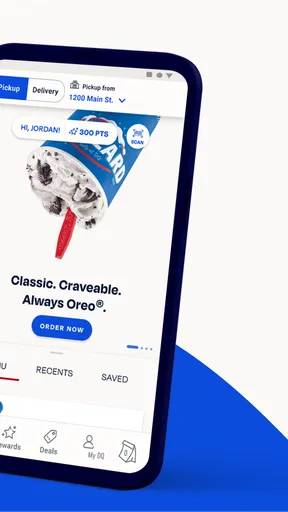
Order-ahead functionality is where I notice the clearest practical improvement over simply walking into a restaurant. Imagine leaving work with ten minutes before a bus, or taking children to an activity and needing a predictable pickup stop afterward. I can use the app to prepare the order before arriving, which changes the visit from browsing and waiting to collecting food with a clearer plan. That is especially useful when I already know everyone’s usual choices.
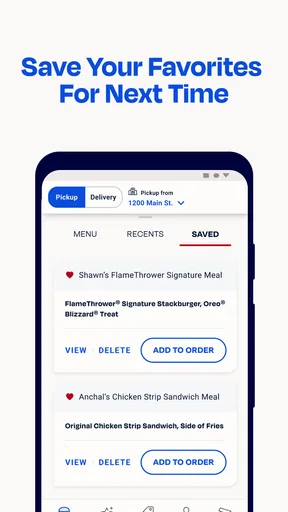
Fast reordering adds another layer of convenience. Instead of rebuilding a familiar order from memory, I can use a previous pattern as a starting point and adjust it. This is valuable for repeat combinations, but I would still review every item before submitting. A saved order is a shortcut, not a guarantee that the same choice is right today. Someone may want a different size, a different treat, or an item that is unavailable at the selected location.
For a family, I would use the app as a preparation tool rather than handing the phone around at the counter. Build the order at home, check the items and quantities, and confirm the selected restaurant before leaving. This reduces the chance of a rushed decision. The trade-off is that advance ordering requires more commitment: if plans change, the convenience can become an inconvenience unless you are comfortable managing the order through the app’s available flow.
What the latest version means for established users
Version 5.1.0 is the clearest current marker of the app’s development. I see it as evidence of ongoing maintenance and refinement rather than a reason to expect a completely different product. For existing users, the sensible expectation is a familiar Dairy Queen ordering and rewards experience with continued attention to the way those pieces work together. I would not install it expecting a general restaurant platform or a major change in how I choose food.
That distinction is important when judging updates. A branded app can improve its usefulness through small adjustments: a smoother path to a saved order, clearer reward handling, or fewer steps between choosing a location and preparing checkout. Those changes may not be dramatic, but they affect how often I am willing to use the app. The current version should therefore be judged by whether it makes repeat visits easier, not by whether it introduces a long list of unrelated tools.
For someone who has used an earlier release, updating is most worthwhile if the app has previously been part of your routine. You already understand the basic purpose, so the benefit comes from keeping the ordering and rewards experience current. For a new user, the version number matters less than the workflow: install it, select the location relevant to your visit, inspect the available offer, and decide whether advance ordering genuinely saves time.
Where the experience can become less smooth
The biggest limitation is that the app is tied to a single restaurant brand and to the practical realities of individual locations. It is not the right tool if you want to compare Dairy Queen with nearby alternatives, combine items from multiple restaurants, or let a delivery marketplace handle the entire decision. A general food-ordering service may be better for discovery and comparison, while this app is better when the destination is already Dairy Queen.
Location choice also deserves care. Before spending time building an order, I would confirm that the selected restaurant is the one I can realistically reach and that its available ordering options match my plan. Choosing the wrong location is an easy mistake when several restaurants are nearby. This is a particularly important workflow tip for travelers: do not prepare an order while still assuming the app has selected the most convenient branch for you.
Another limitation is the difference between a digital menu and a promise of unlimited availability. Restaurant inventory, operating conditions, and local participation can affect what a customer can actually order. I would keep a flexible backup choice in mind, especially when ordering for several people. The app can make the process faster, but it cannot eliminate the possibility that a preferred item or offer will not fit the selected visit.
There is also a behavioral downside to convenience. Rewards, deals, and fast reordering are designed to make returning easy, which is helpful if Dairy Queen is already where I want to eat. They are less helpful if I am trying to reduce impulse purchases or compare the full cost of a meal carefully. In that situation, I would use the app only after deciding on a budget and a meal, rather than opening it first and letting the available promotion shape the choice.
Who will get the most from it
I recommend the app most strongly to regular Dairy Queen customers, families with repeat orders, and people who frequently pick up food on a schedule. It is also a good match for anyone who dislikes waiting at the counter but still wants to order directly through the brand’s own app. The rewards and offer features make more sense when you expect to return, while order ahead and reordering help when your choices are fairly predictable.
It can also suit a person who wants a simple way to check the brand’s current ordering options before leaving home. Instead of arriving and discovering that a quick stop will take longer than expected, I can prepare in advance and make a more informed decision. That does not guarantee a perfectly timed pickup, but it gives me more control over the visit than walking in without a plan.
I would suggest skipping it if you rarely visit Dairy Queen, prefer to compare many restaurants in one place, or do not want another loyalty account in your routine. A casual customer may get little benefit from rewards, and a person who always orders spontaneously may not use the advance-ordering tools enough to justify the extra setup. In those cases, the ordinary in-person experience or a broader food-ordering alternative may be simpler.
Questions I would answer before installing
If you are wondering whether it costs anything to download, the app itself is free. That makes it easy to try without paying for access, but the sensible test is whether the offers, rewards, and faster ordering actually improve your own visits. I would install it for convenience, not because the free download alone guarantees savings.
If you are asking whether it is suitable for children, its Everyone content rating means the app is presented for a general audience. In practice, an adult will still want to supervise account details, payment decisions, and the final order when the app is being used for a family. The rating describes the app’s content audience; it does not replace ordinary care around purchases.
If you are unsure whether it will work on an older phone, the listed minimum operating system is Android 8.0. That gives the app a reasonably broad Android range, although the real experience can still depend on the device and its software condition. I would check the phone’s system version before planning to rely on the app for an important pickup.
If you are deciding between this app and a general delivery or restaurant app, I would choose based on the task. For direct Dairy Queen rewards, brand-specific offers, fast reordering, and order-ahead planning, this app is the more focused choice. For restaurant comparison, broader discovery, or a single order involving several brands, a general alternative is likely more convenient. The difference is not about which app is universally better; it is about whether you already know where you want to eat.
What I would watch in future updates
As the app continues to evolve, I would pay attention to how clearly it handles the handoff between offers, rewards, saved orders, and advance pickup. Those are the areas that determine whether the app feels like one coherent visit assistant or several separate tools placed together. Clearer confirmation steps would be especially valuable because a mistaken location or misunderstood promotion can erase the time saved elsewhere.
I would also watch how well the app serves two different audiences: loyal customers who want speed and occasional visitors who need guidance. Regulars benefit from shortcuts, while newcomers need transparent menus, understandable offer rules, and confidence that they are ordering from the right place. The best future improvements would preserve the fast path without making first-time use confusing.
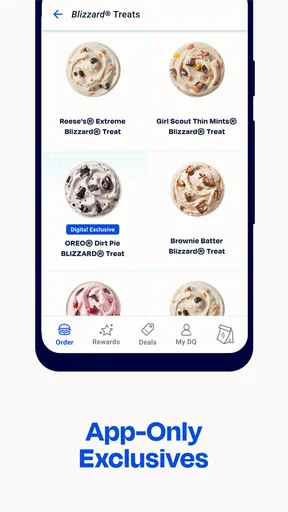
My final view is that this is a focused, worthwhile app when Dairy Queen is already part of your eating routine. The strongest combination is not any single feature; it is the way exclusive offers, rewards, fast reordering, and order-ahead planning can support the same visit. I would use it before a planned stop, review the order rather than trusting an old one blindly, and confirm the location before submitting. With those habits, Dairy Queen® Food & Treats becomes a genuinely useful shortcut. Without regular visits or a clear need for brand-specific ordering, it is easy to leave unused on the phone.
Privacy and Permissions
See what permissions an app requests and how it handles your data.
- Contacts
- read your contacts
- Location
- approximate location (network-based), precise location (GPS and network-based)
- Camera
- take pictures and videos
- Other
- view network connections, full network access, run at startup, control vibration, prevent device from sleeping, read Google service configuration
Verdict
Strengths of Dairy Queen® Food & Treats
- Easy mobile ordering for pickup at participating locations.
- Menu includes burgers, chicken, snacks, desserts, and beverages.
- Customizable treats make it easier to adjust toppings and ingredients.
- Store locator helps find nearby Dairy Queen restaurants quickly.
- Promotional offers may provide savings on selected food and treats.
Limitations of Dairy Queen® Food & Treats
- Features and ordering availability vary by restaurant and location.
- Some menu items may be unavailable during busy periods or seasons.
- Prices, taxes, and fees can differ between locations and orders.
- The app may require location access to show nearby restaurants accurately.
- Delivery availability depends on third-party services and participating stores.
Similar Picks in This Category
View All
Rappi: Food Delivery, Grocery
Rappi, Inc - Delivery3.5

McDonald’s: Cupons e Delivery
Arcos Dorados4.3

Swiggy: Food Instamart Dineout
Swiggy4.7

Blinkit: Groceries & more
Blinkit4.8

foodpanda: food & groceries
Foodpanda GmbH a subsidiary of Delivery Hero SE4.0

Zomato: Food Delivery & Dining
Zomato4.7
Frequently Asked Questions
What can I do with the Dairy Queen® Food & Treats app?
The Dairy Queen® Food & Treats app is designed to make ordering from participating DQ locations more convenient. Depending on your area, you can browse the menu, customize eligible food and treats, place pickup or delivery orders, save favorite items, and find nearby restaurants. Available features, menus, prices, and ordering options may vary by location and restaurant participation.
Does the Dairy Queen® app offer rewards or special deals?
Yes, the app may include a rewards program, exclusive promotions, digital coupons, and offers for registered users. After creating or signing into an account, you can generally view available benefits and track qualifying activity. Promotions often have expiration dates, location restrictions, or item-specific conditions, so it is important to read the individual offer details before ordering.
Can I place delivery and pickup orders through the app?
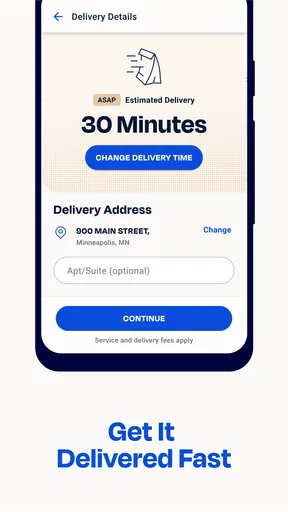
The app can support pickup and, in selected locations, delivery ordering. You usually begin by choosing a nearby participating restaurant, selecting a service method, and reviewing the estimated preparation or delivery time. Delivery availability, fees, minimum order requirements, and menu choices depend on your address and the local DQ restaurant or delivery partner.
Is every Dairy Queen menu item available in the app?
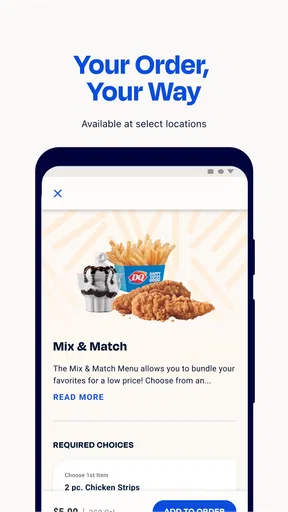
Not necessarily. The menu shown in the app is based on the restaurant you select, so certain items, flavors, sizes, toppings, combo options, or seasonal treats may be unavailable. Local franchise operators can also have different menus and pricing. Checking the selected location before completing an order is the best way to confirm availability and cost.
Do I need an account to use the Dairy Queen® Food & Treats app?
Some basic features, such as browsing locations or viewing parts of the menu, may be available without signing in. However, an account may be required for rewards, personalized offers, order history, saved favorites, and certain ordering functions. You should also review the app’s privacy information and permissions so you understand how account and location data are handled.
